TL;DR: I built a custom Raycast extension that manages all my dev projects from a single launcher. Each project gets a .project-launcher.json at its root that stores the editor preference, env vars, start commands, and quick-access apps. The config lives in the repo, not in the tool – it moves with the project, survives reinstalls, and works without Raycast-specific knowledge. 80% was generated by Claude Opus in a weekend; the remaining 20% was fixing what it overcomplicated or invented.
A homogeneous project portfolio is manageable. Same stack, same setup ritual; muscle memory handles it. The friction starts when projects diversify: DDEV for a WordPress client site, Docker Compose for a Node service, bare npm for an Obsidian plugin, a shell script for something experimental. Each project is its own mental model.
After 3-4 weeks away from a project, I’d open the terminal, cd into the directory, and open the README just to remember how to start the dev environment. Some projects need PhpStorm. Others work better in Sublime Text. A few require specific env vars – a company Claude Code API key vs. a personal one. “Jumping into a project” had grown into a small research task before any actual work happened. More friction means slower progress, or me losing interest in personal projects.
The solution wasn’t better documentation – I tried it, but it did not work out for me. It was encoding that per-project context into a config file, not a MD document, that lives alongside the code. Now, a .project-launcher.json at each project root stores everything my launcher needs to know. The Raycast extension is the runner – it reads the config and does what it says.
This is a personal tool with hardcoded opinions – my editors, my terminal, my workflow. It’s not a framework or a product. But the architectural decisions behind it are transferable, and the Raycast-specific gotchas don’t show up in tutorials. This post covers both, plus an honest look at what Claude Opus produced vs. what I had to fix.
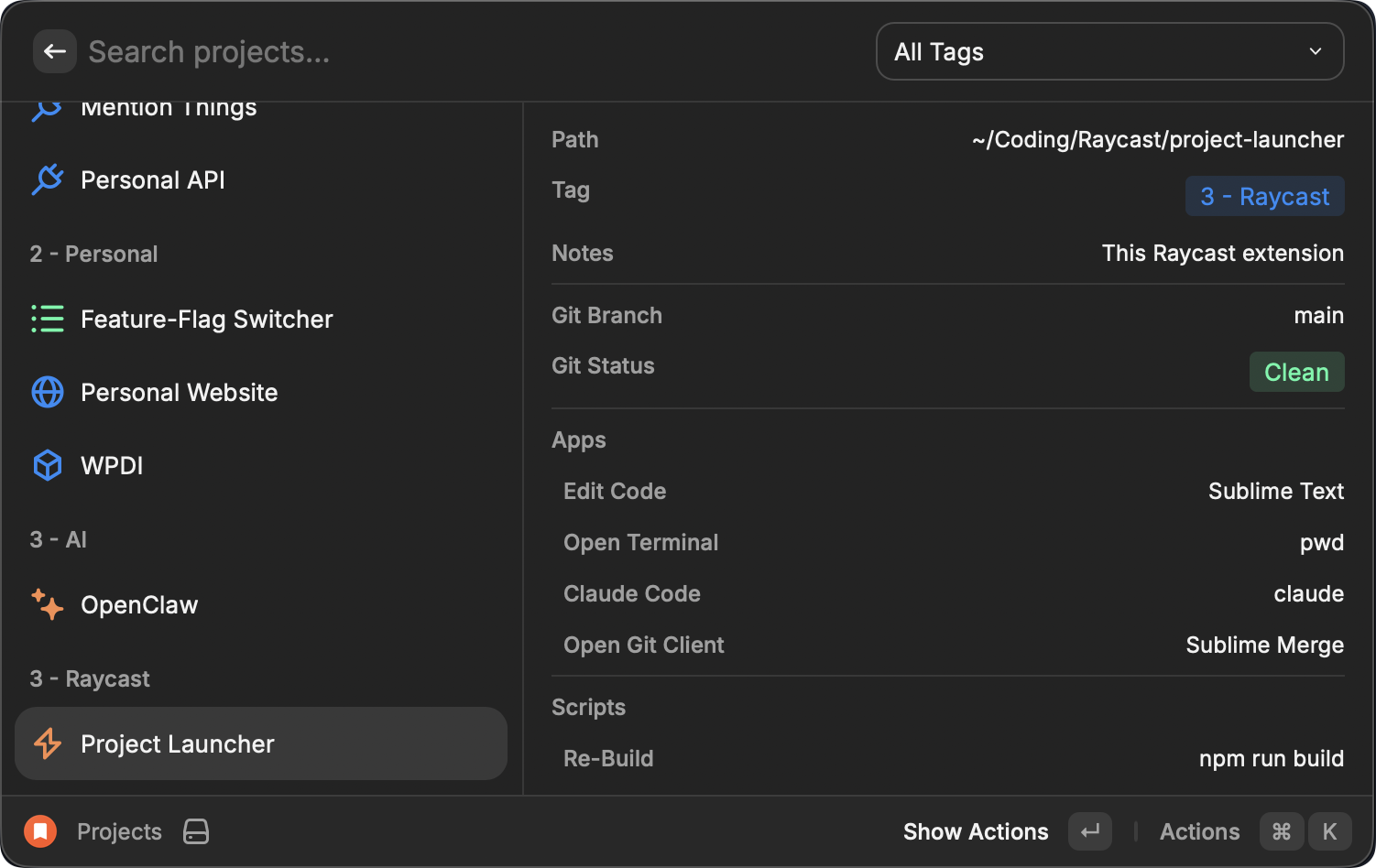
Config Belongs in the Repo, Not in the Tool
Insight: The config file is the real extension. Raycast is the runner.
The first decision was where project metadata lives. Raycast has LocalStorage – a key-value store that persists between launches. The obvious approach: store everything there. Project name, editor, env vars, and start commands – all in Raycast’s database.
I think that’s the wrong model, because it ties project knowledge to a single tool. LocalStorage moves nowhere. If I reinstall Raycast, switch machines, or decide to build a different launcher, that metadata is gone. Also, I have no control over the stored data, and every new field or config option needs a Raycast dialog to enter the field, which means more work for me. Using the JSON file, the project contains all knowledge about itself, plus I can extend it in any text editor.
So LocalStorage holds only one fact: the project path. Everything else lives in .project-launcher.json at the project root. Here’s the extension managing itself:
{
  "name": "Project Launcher",
  "meta": {
    "icon": "Bolt",
    "color": "Orange",
    "tag": "3 - Raycast",
    "notes": "This Raycast extension",
    "editor": "Sublime Text"
  },
  "apps": ["editor", "terminal", "claude", "git"],
  "scripts": [
    {
      "label": "Re-Build",
      "command": "npm run build",
      "icon": "Repeat",
      "color: "Orange"
    }
  ],
  "env": {}
}
"editor": "Sublime Text" overrides my global PhpStorm preference for this one project. "claude" is a shorthand that opens Claude Code in a terminal session. The Re-Build script runs npm run build as a background task with a toast notification, and I can see that this project does not use any custom env variables.
Config resolution cascades through three layers: the JSON file overrides global Raycast preferences, which override hardcoded fallbacks. Set PhpStorm as the default editor in Raycast preferences. Can be overridden with "editor": "Cursor" in a specific project’s config file. A project with no config file at all still works – it gets the global defaults. The tradeoff is creating a config per project, but good defaults make this optional rather than mandatory.
Apps Are Launchers, Scripts Are Tasks
The core functional split: apps[] and scripts[] do fundamentally different things.
Context:
"git"returns null if the project has no.gitdirectory. The action disappears entirely – conditional visibility without conditional config.
An app is something you interact with. It either opens a macOS application with the project path (open -a "PhpStorm" "/path") or starts an interactive terminal session with env vars exported and a command running. A script is something that completes and reports back – a background shell command via execSync with a 120-second timeout, a progress toast, and a success/failure notification.
The original design had a type field: "ddev" | "docker-compose" | "none". I dropped it in favor of free-form shell commands. The extension doesn’t need to know about DDEV, Docker Compose, or Lando. It runs whatever you type. ddev start, docker-compose up -d, ./scripts/start.sh – all identical from the extension’s perspective. Zero code changes when the stack changes.
String shorthands keep the config readable. "editor", "terminal", "git", "browser", "claude" expand at resolution time using preferences and project context:
case "editor":
  return {
    label: "Edit Code",
    app: metaEditor || p.defaultEditor || "PhpStorm",
    icon: "Code",
    shortcut: "cmd+o",
  };

case "git":
  if (!isGitRepo) return null;
  return {
    label: "Open Git Client",
    app: p.gitClient || undefined,
    icon: "CheckList",
    shortcut: "cmd+g",
  };
Editors and git clients are macOS app name strings launched via open -a. No enums, no code changes to support Cursor, Zed, Nova, or anything else that registers with macOS.
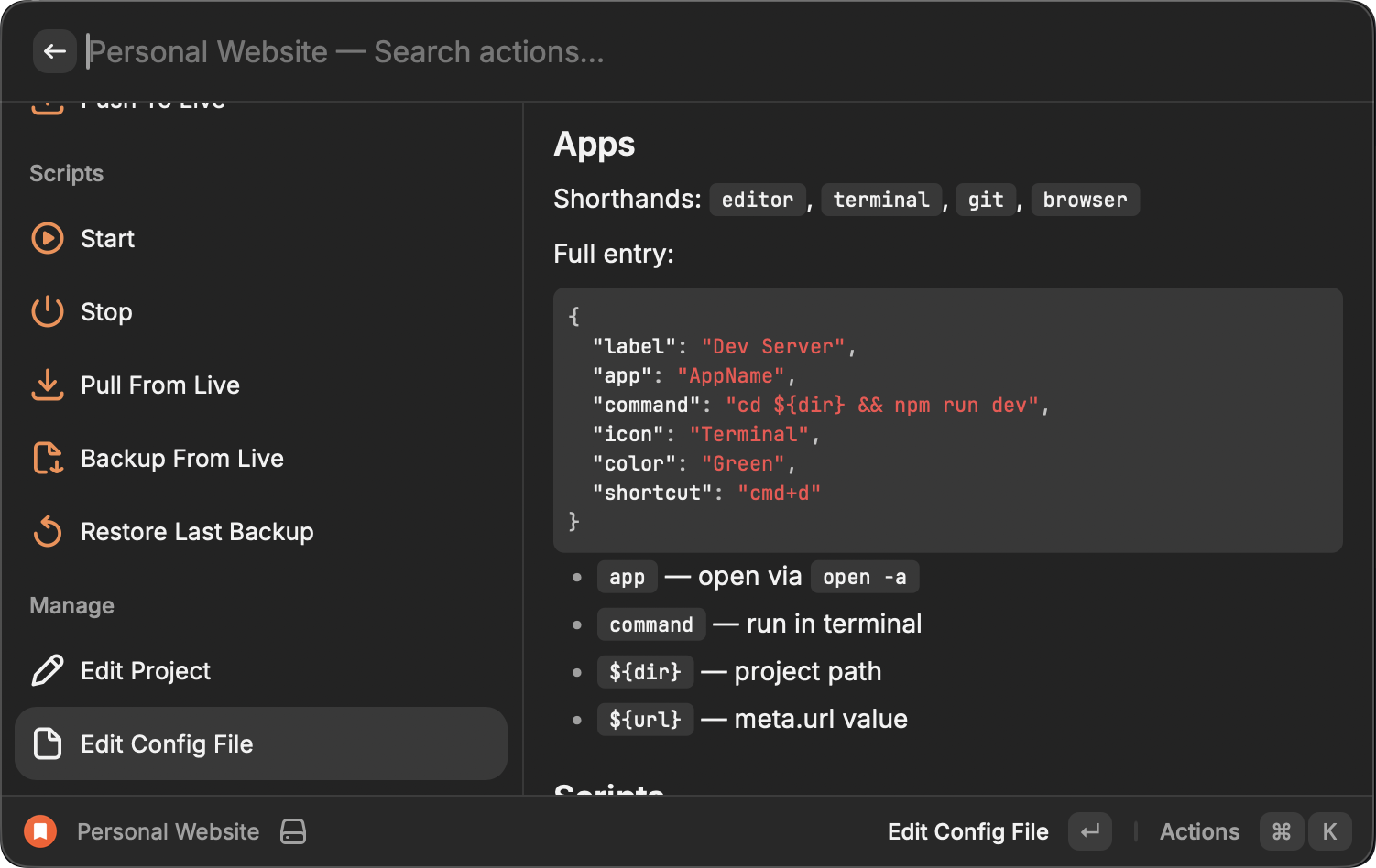
Raycast Is Not a Browser
Raycast uses React. It renders with AppKit. That gap produces behavior you won’t find in any web React app.
Gotcha: Raycast’s Node process doesn’t inherit the shell PATH. Any Homebrew tool –
ddev,docker,npm– silently fails without manual PATH injection.
The 50ms selection fix. selectedItemId on <List> should restore the last-opened project when the extension launches. It doesn’t. Raycast bridges React to native AppKit, and the native layer registers items asynchronously relative to React renders. Setting the selected ID in the same cycle as items appear is silently ignored.
Five approaches failed before this one worked:
useEffect(() => {
  if (items.length > 0 && lastOpenedId) {
    setTimeout(() => setSelection(lastOpenedId), 50); // This!
  }
}, [items.length, lastOpenedId]);
PATH injection. projectEnv() manually builds the PATH because Raycast’s process doesn’t inherit it from the shell:
function projectEnv(config: ResolvedConfig): NodeJS.ProcessEnv {
  return {
    ...process.env,
    PATH: [
      "/usr/local/bin",
      "/opt/homebrew/bin",
      "/usr/bin",
      "/bin",
      "/usr/sbin",
      "/sbin",
      "/Users/philipp/File-Catalog/bin"
      process.env.PATH,
    ].join(":"),
    ...config.env,
  };
}
I need this, because the background commands do not load my regular .zshrc with the full path map. I’m making sure that I can use all commands here – including Homebrew and custom scripts from my “file catalog”.
AppleScript for terminal sessions. Raycast can’t open a terminal with a specific command natively. The workaround is osascript telling Terminal.app to do script:
execSync(
  `osascript -e '
    set wasRunning to application "Terminal" is running
    tell application "Terminal"
      if wasRunning then
        do script "${escapeForAppleScript(fullCommand)}"
      else
        activate
        delay 0.1
        do script "${escapeForAppleScript(fullCommand)}" in front window
      end if
      activate
    end tell'`,
  { timeout: 5000 },
);
It handles “already running” vs. “fresh launch” as separate branches: in front window prevents spawning multiple tabs in the Terminal, when it was not running already. The 0.1-second delay on fresh launch waits for the window to exist before writing to it. I found this by trial and error – without that delay, the command is sometimes ignored.
What Claude Built and What I Fixed
The extension was 80% vibe-coded with Claude Opus in a weekend. It’s small, and I code-reviewed the changes, but only touched the code when needed. The architecture it produced is principled – 19 ADRs document every major decision. But Claude also generated things that needed removing.
Insight: AI solves each problem locally. It doesn’t recognize that ten locally correct fixes compound into an overcomplicated codebase.
The process started with a lengthy Claude Sonnet conversation – research and web searches to evaluate different approaches. Raycast extensions emerged as the right fit. Then one Opus conversation with a single prompt: “Draft the custom Raycast extension we discussed. Only use Raycast, no other tools.” Opus produced a downloadable zip. From there: npm run dev, iterative Claude Code sessions of 10-20 minutes each, ending with updating docs or writing a new ADR before starting the next session.
What Claude got wrong fell into three patterns:
- Overcomplicated config. Generated more structure than needed – extra nesting, unnecessary abstraction layers. Had to manually consolidate and simplify.
- Icon abuse as behavior trigger. Used the icon prop to drive logic – the “Stars” icon triggered opening Claude Code for every app that used it. Structurally wrong. Required manual refactoring to separate display from behavior.
- Scope drift. Over time, Claude started adding inline comments justifying additions and inventing features I never requested. Support for three different terminal apps when I use one. The additions came with plausible explanations, which made them harder to catch than outright bugs.
The pattern underneath all three: AI solves the immediate problem without foresight. Each fix is locally correct – add a param here, a new prop there. But after ten of those, the codebase is bloated with isolated solutions that don’t compose. When I corrected the icon-as-trigger hack, Claude swung to the opposite extreme: brand new dedicated props instead of reusing an existing one. The correct path was the middle ground, and finding it required understanding the whole system, not just the bug report. Claude’s architecture was usable. Claude’s judgment about where to put things wasn’t. The 20% I fixed was mostly removal, not addition.
Conclusion
Per-project config in the repo is the actual solution. The Raycast extension is the delivery mechanism – and it could be replaced by any tool that reads a JSON file and launches apps.
The repo is public. Fork it, run npm install and npm run dev, and you’re set. Five minutes to a working launcher. The extension manages itself the same way it manages every other project – its own config file is the best starting point.
This is a personal tool with my opinions baked in. No store submission, no multi-user support. It solves exactly the problem I had: diverse projects with different stacks, different editors, and different env vars, all accessible from one keyboard shortcut. If your portfolio is homogeneous, you don’t need this. If you’ve forgotten how to start a project you worked on last month, the config file is where to begin.